
Building a Chatbot with RAG: How Retrieval Meets the LLM
A practical look at Retrieval-Augmented Generation: embeddings, vector search, and how to wire them to an LLM—plus how this portfolio implements the same pattern with Next.js, Supabase pgvector, and Hugging Face.
Large language models are impressive at language and reasoning, but they do not know your private docs by default. They can also hallucinate facts or cite things that sound right but are not grounded in anything you control. For a site assistant, internal wiki bot, or support copilot, you usually want answers that stick to your content and stay up to date when you change the site.
Retrieval-Augmented Generation (RAG) is a pattern that does exactly that: before the model answers, you retrieve the most relevant slices of your knowledge, inject them into the prompt, and ask the model to generate an answer that uses that material. This post walks through the concepts, why vector search shows up in almost every RAG stack, a minimal mental model + sample shape for code, and—where it helps—how I wired the same ideas in this portfolio.
The RAG loop in one breath
- The user sends a question (chat message).
- You turn that question into a vector (an embedding) so you can compare it to stored chunks.
- You search your knowledge store for the top pieces of text (chunks) whose vectors are closest to the query vector.
- You format those chunks into a single context block (often with titles, URLs, and scores).
- You call the LLM with a system prompt plus that context plus the user message.
- The model returns an answer that is conditioned on the retrieved text—not on memorized weights alone.
That is the whole architecture: retrieve → augment the prompt → generate. It is not fine-tuning; you are not changing model weights. You are changing what the model sees at inference time.
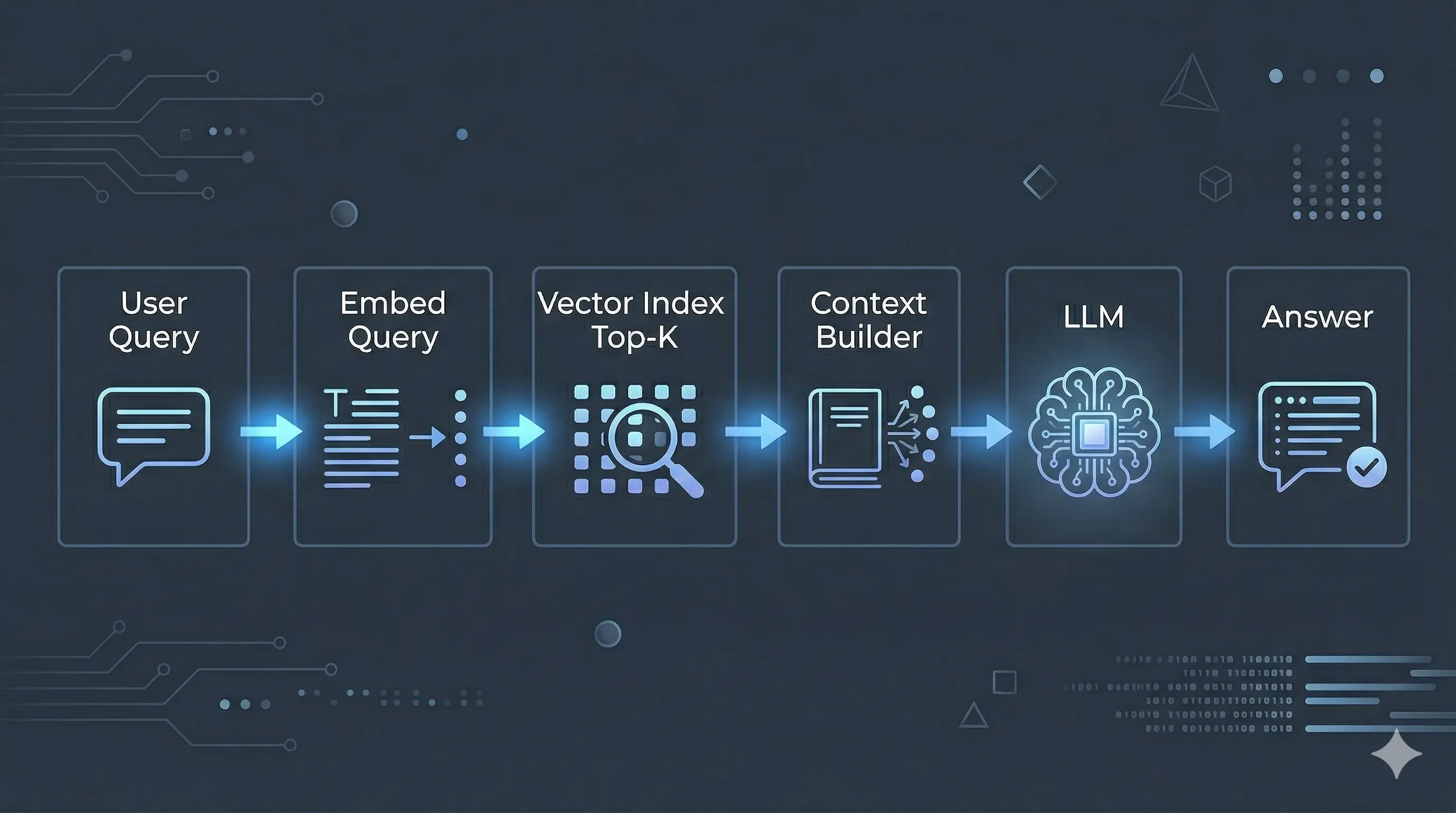
Figure: the RAG control flow—retrieve relevant chunks, add them to the prompt, then generate.
Embeddings: from text to “nearness”
An embedding model maps text (a sentence, a paragraph, a chunk) to a fixed-length list of numbers—a point in a high-dimensional space. Texts that are semantically similar (same topic, paraphrase, or shared intent) tend to land closer in that space than unrelated texts.
That gives you a useful shortcut: instead of asking “which document contains these exact keywords?”, you ask “which stored vectors are closest to this query vector?”. That behaves well when users rephrase questions or use different words than your docs.
You must use the same embedding model (and dimension, e.g. 384) for ingestion and for queries. Mixing models breaks geometry: distances become meaningless, and retrieval quality collapses. If you upgrade the embedder, plan a full re-index.
Cosine similarity is the usual choice for text embeddings: you care about direction in space more than raw magnitude. Databases such as Postgres with pgvector expose distance operators; your app often converts distance to a score in [0, 1] so thresholds are easier to reason about.
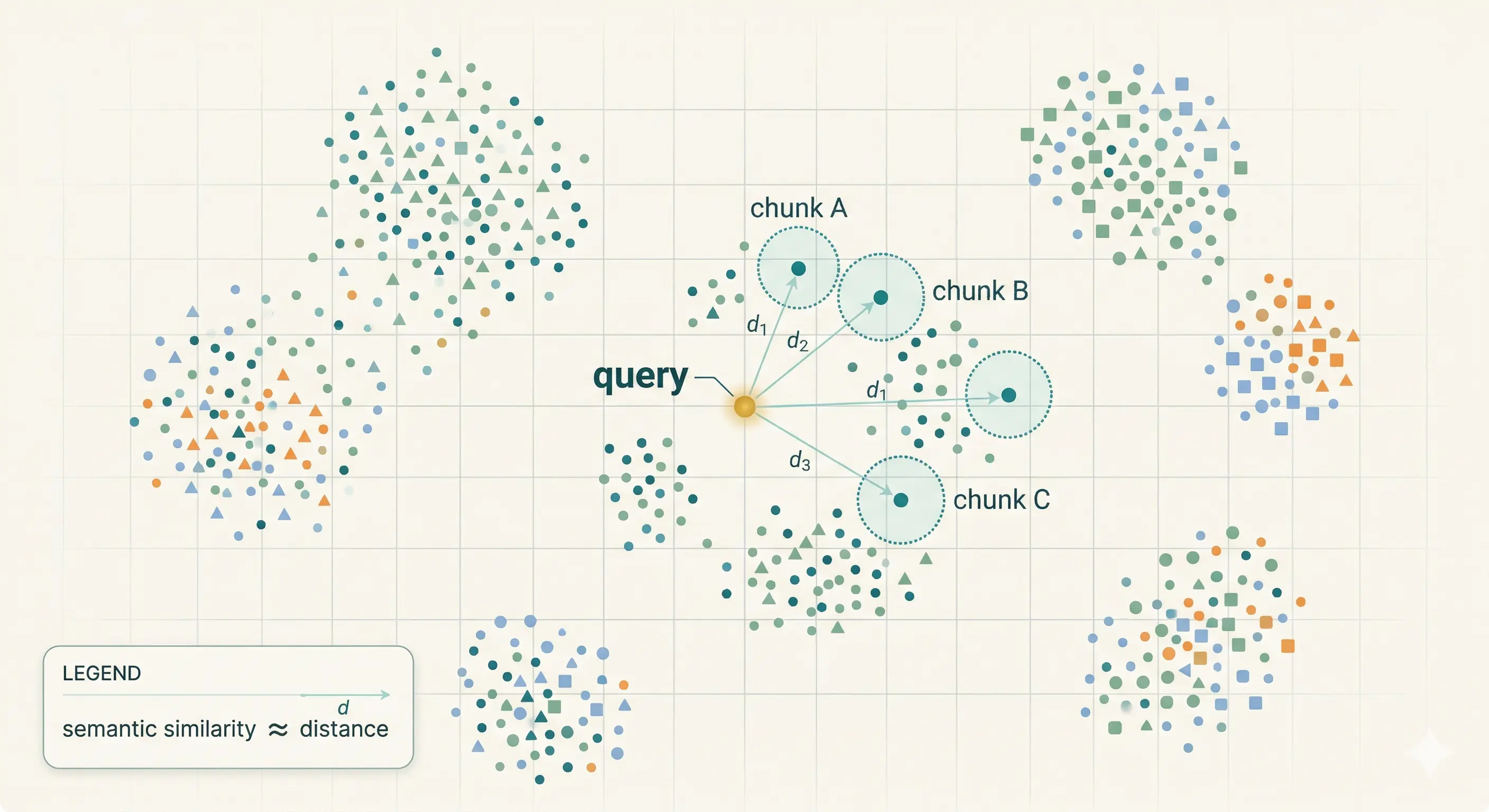
Figure: similar meaning → nearby vectors; retrieval picks neighbors of the query embedding.
Why people say you need a “vector database”
You need two things at scale:
- A place to store vectors with metadata (source URL, title, type, raw text).
- Fast similarity search—usually approximate nearest neighbor (ANN)—so you are not scanning every row with a naive brute-force comparison on each request.
Products marketed as vector databases are purpose-built for that. In practice, many teams get the same outcome from Postgres + the pgvector extension: one database for relational data and vector columns, with indexes such as HNSW or IVFFlat for ANN search.
So when tutorials say you “need a vector database,” read it as: you need vector storage + a similarity query path + indexes. pgvector inside Supabase (or any hosted Postgres that supports it) is a perfectly legitimate choice for a portfolio or small product, which is the path this site uses.
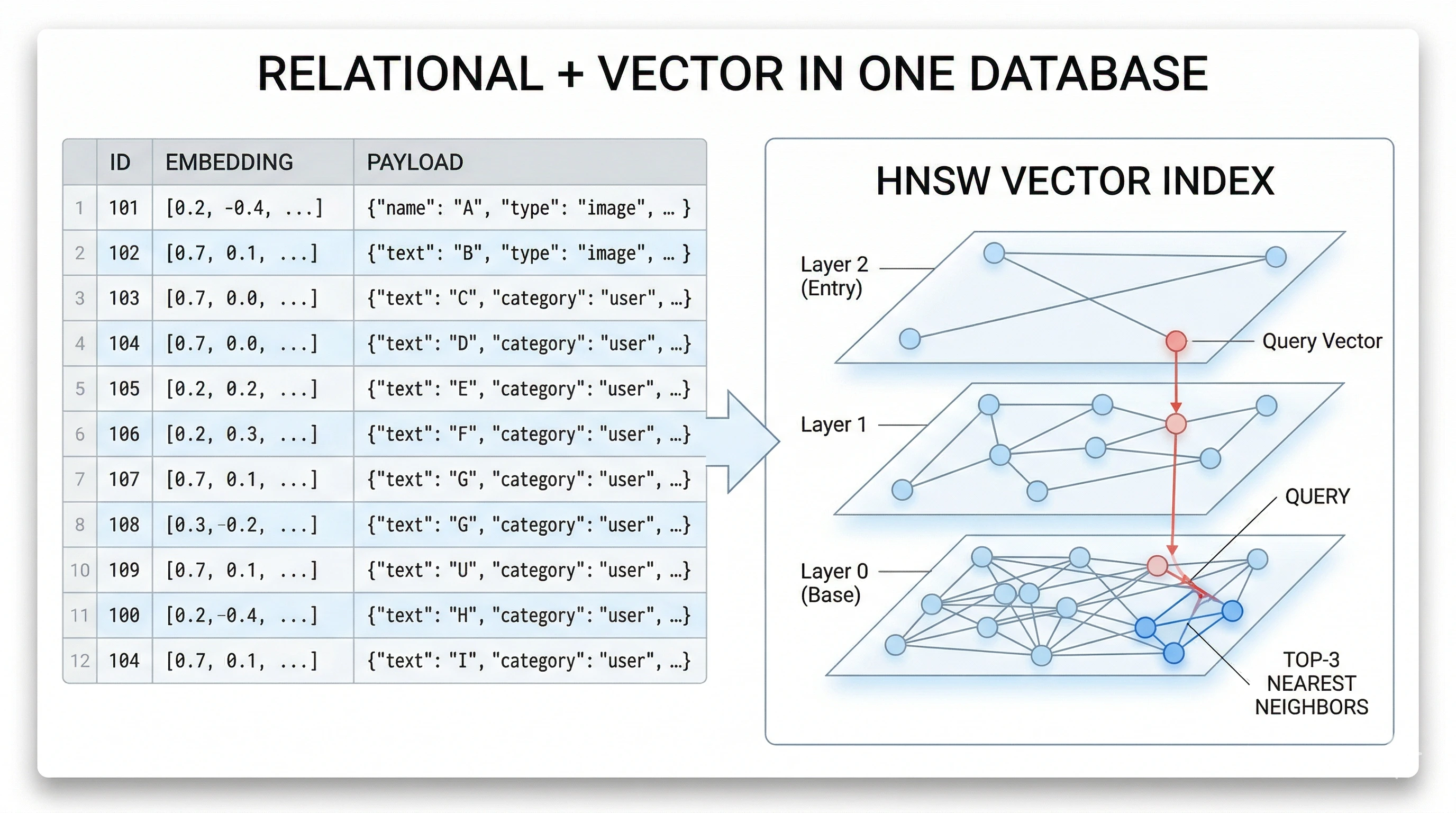
Figure: one database can hold rows, JSON payloads, and vector indexes for fast similarity search.
Ingestion: how knowledge gets into the index
Ingestion is everything that happens before a user chats:
- Source material — pages, Markdown, CMS exports, PDFs, etc.
- Chunking — split text into pieces sized for retrieval (often hundreds to a couple thousand tokens, with overlap so sentences are not cut awkwardly).
- Embed each chunk — call your embedding API or local model once per chunk.
- Persist — for each chunk, store at least:
id, embedding vector, and a payload (title, URL,content, tags, type, whatever you need to render citations or links).
When content changes, you re-embed affected chunks (or the whole index for simplicity on small sites).
Chunking trade-offs: tiny chunks retrieve with precision but lose surrounding context; huge chunks retrieve with noise and burn context window. A common compromise is paragraph- or section-level splits with a small overlap (a sentence or two) so phrases split across boundaries still appear whole in at least one chunk. For structured sites (projects, blog posts, skills), you can often chunk per logical record instead of arbitrary token windows—your metadata stays cleaner.
Payload design: store everything the LLM (or the UI) might need without another database round-trip: human-readable title, summary, canonical url, type (project, blog, doc), optional tags or tech[], and the full content for that chunk. Rich payloads make it easier to tell the model to emit markdown links that actually resolve on your domain.
Query time: from user message to grounded answer
When a message arrives:
- Embed the user query (same model and dimension as ingestion).
- Search for
top_ksimilar chunks (and optionally filter by metadata). - Apply thresholds — drop low-similarity noise so the model is not fed garbage.
- Build a context string — concatenate the survivors into one block, respecting the model’s context window (truncate or cap total characters).
- Call the chat API — system instructions (“use only the context”, “cite links”, etc.) + context + user message.
If retrieval returns nothing useful, decide explicitly: return a safe “I don’t have that in the knowledge base” style answer, or fall back to a generic model reply with a disclaimer. Silence on this choice is how bots invent facts.
Two-pass retrieval is a simple pattern that helps when the user’s wording is vague: first search with a stricter similarity threshold and a modest top_k; if you get too few results, run a second search with a lower threshold or a higher top_k, then merge and de-duplicate by chunk id. Your formatter should still cap total characters so the prompt does not overflow.
Minimal code shape (TypeScript-style)
The following is not a full application—it is the skeleton most RAG chat routes share:
async function answerUserMessage(userText: string) {
  const q = await embed(userText) // same model/dim as your index

  const hits = await vectorSearch({
    queryVector: q,
    limit: 8,
    minScore: 0.5,
  }) // returns [{ id, score, payload }, ...]

  const contextBlock = formatHitsForLlm(hits) // one string, capped by max chars

  const messages = [
    { role: "system", content: systemPrompt + "\n\nContext:\n" + contextBlock },
    { role: "user", content: userText },
  ]

  return await chatComplete(messages) // stream or buffer
}
Your embed, vectorSearch, formatHitsForLlm, and chatComplete implementations depend on vendors (OpenAI, Anthropic, Hugging Face, etc.) and on whether the database is Supabase, Pinecone, or something else—but the control flow stays the same.
A deliberately boring formatHitsForLlm might look like this: numbered blocks, relevance percentage, and explicit fields the system prompt can refer to (“Blog Post URL”, “Repository URL”). Consistent structure beats clever prose here—the model learns the pattern after a few examples.
function formatHitsForLlm(hits: Hit[], maxChars: number) {
  let out = ""
  for (let i = 0; i < hits.length; i++) {
    const block = `[${i + 1}] ${hits[i].payload.title} (score: ${hits[i].score})\n${hits[i].payload.content}\n\n`
    if (out.length + block.length > maxChars) break
    out += block
  }
  return out
}
Streaming: returning tokens as they arrive improves perceived latency. RAG does not change streaming semantics—you still stream the assistant completion—but you wait for retrieval and prompt assembly before you open the stream. If the chat API fails for one model, some apps try another model with the same context (your route logic may already do something similar).
In my portfolio: where each idea lives
This site’s assistant follows the same ladder. Here is a concise map from concept to artifact in the repo:
| Concept | Where it lives |
|---|---|
| Embedding model (384-dimensional MiniLM) | lib/embeddings.ts — sentence-transformers/all-MiniLM-L6-v2 |
| Storing vectors + JSON payloads, similarity RPC | Supabase table portfolio_kb_chunks, RPC match_portfolio_kb; lib/portfolio-kb.ts (searchSimilar, upsertVectors) |
| Turning hits into a capped context string | lib/chat-context.ts — buildRagContextForChat |
| HTTP API, HF chat, streaming / fallbacks | app/api/chat/route.ts |
| Building chunks from projects, blog, about, etc. | scripts/populate-knowledge-base.ts |
So the tutorial above is the generic story; the table is how I folded it into Next.js on the server only—service role keys and Hugging Face tokens stay in server environment variables, never in the browser bundle.
The migration in this repo defines the pgvector side (table + RPC + index policy) as infrastructure-as-code; the app assumes those objects exist and talks to them through the Supabase client. That separation keeps the tutorial portable: you could swap Supabase for another Postgres host and keep the same mental model.
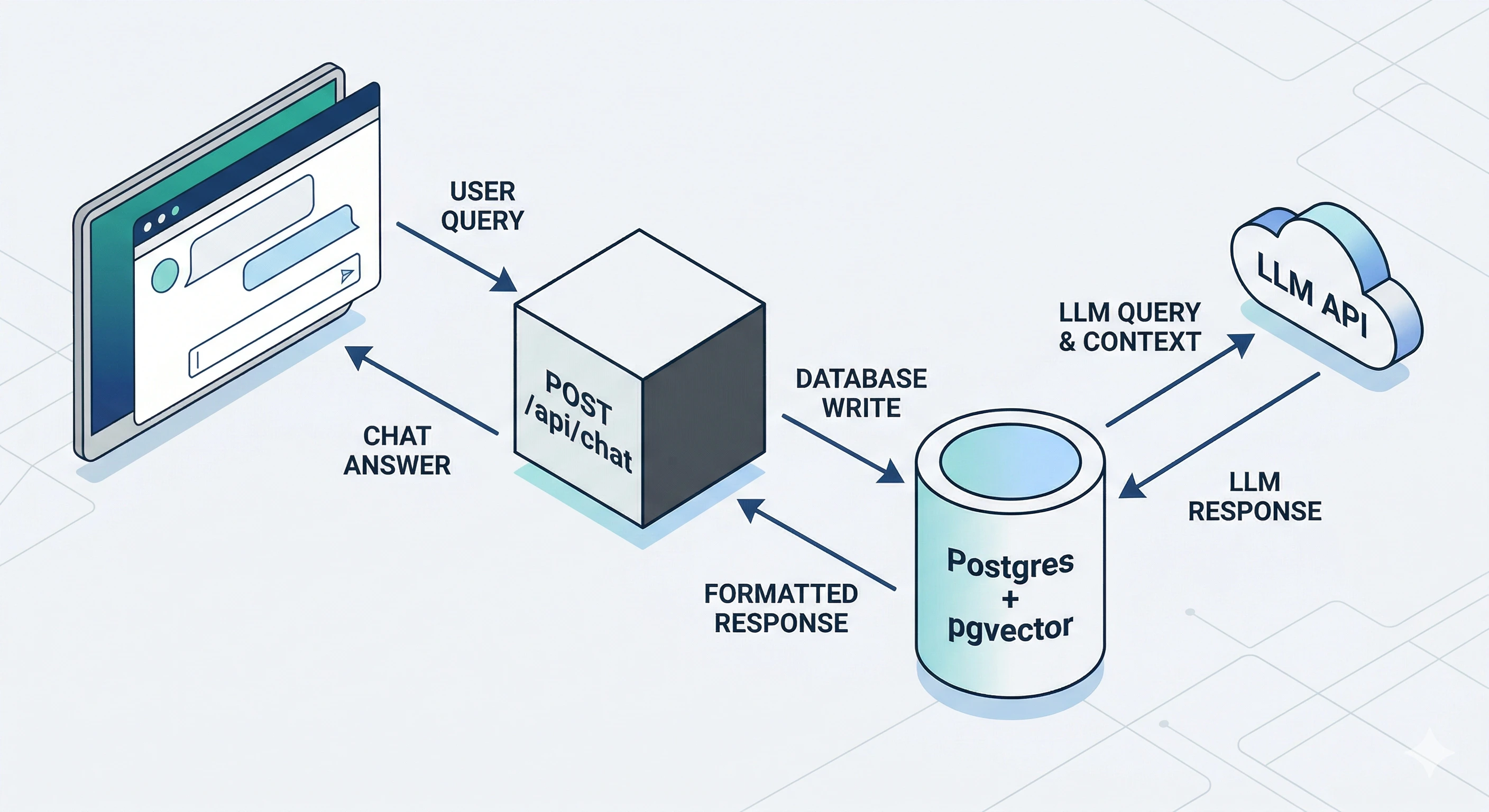
Figure: browser hits your app’s chat route; the server embeds, queries the vector index, then calls the LLM—keys stay on the server.
Pitfalls worth naming early
Empty retrieval is the first thing you will hit in the real world. Symptoms: the model answers from general knowledge when you wanted site-only answers. Mitigations: log scores, tune min_score, widen top_k on a second pass, and improve chunking so the right text actually exists in the index.
Prompt bloat is the second. Symptoms: slow responses, truncated instructions, or contradictory facts pulled from too many chunks. Mitigations: hard-cap total context characters, deduplicate near-identical chunks, and prefer structured lines (URLs separate from body text) so the model can scan faster.
Stale index is a process problem. Symptoms: the bot describes an old job title, dead links, or removed projects. Mitigations: run your populate script in CI after content merges, or on a schedule, and surface “last indexed” in admin tooling if you have it.
Secrets and access control are non-negotiable. The browser should call your API route; that route alone should hold database service credentials and third-party API keys. Row Level Security (RLS) on chunk tables—with no broad anon read policies—is a good backstop so a leaked anon key still cannot dump your index.
RAG vs fine-tuning (one line)
RAG changes inputs at query time. Fine-tuning changes weights. For frequently changing site content, RAG (plus periodic re-embedding) is usually the right first move.
Closing
If you are building your first RAG chatbot, implement the short control loop (embed → top_k → context → chat), keep secrets server-side, and treat ingestion as part of your release process. From there you can add streaming UX, better chunking, and evaluation—but the conceptual spine stays: retrieve, augment, generate.
For a concrete comparison of React patterns (unrelated to RAG but part of the same blog), see Understanding React Hooks.
Post Details
Navigation
Related posts
Answer Engine Optimization for Next.js: Schema, llms.txt, and Proving It Shipped
A practical pass at making a Next.js site legible to AI answer engines: allowing the crawlers, publishing llms.txt, adding FAQPage and HowTo schema without hand-maintaining it, and asserting in the build output that all of it actually rendered.
Read more →Essential Security Practices to Protect Your Web Applications
Practical, easy-to-apply security improvements for any online project — from security headers, rate limiting, login protection, to safe file uploads and more.
Read more →Deploy Next.js on Ubuntu with Git, PM2, Nginx, and Certbot
Production-ready guide to deploy a Next.js app on Ubuntu using Git for code, PM2 for process management, Nginx as reverse proxy, and Certbot for HTTPS.
Read more →